Posts

Showing posts with the label Windows 10 Mobile

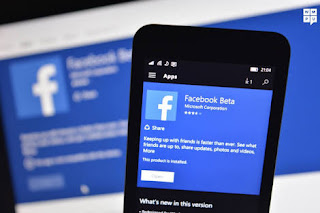
Facebook Beta for windows 10 mobile snags an Update.
Image
Facebook Beta for windows 10 Mobile Got a Minor Update The company Pushed New Update to Fb beta App version 10.3.103.0 The New update Brings Nothing but have lot Of minor Bug fixes. • Added Image viewer Feature •  fixed a bug at crashing time •  fixed a bug when you opened the App immediately it shows Error the bug has been fixed •  fixed a bug that would helps you to handle the App Smoothly Although They Released a small update The update helps fixed All Bugs and Having New Look. To Download the New Update * open store *  click on Downloaded Apps. means it shows you Downloaded Apps List Just press on Facebook Beta App * open it and Press on ***update*** Source : Notification from windows store & Microsoft.

Windows 10 Mobile Preview Build 14327 Released: Supports Sending/Receiving Texts From Windows 10 PC, Cortana Supports More Languages

Image
In an effort to deliver unifying experience with Windows 10 devices, Microsoft’s new app named “Messaging Everywhere” for Windows 10 Mobile allows users to send and receive text messages from a Windows 10 PC. This new app is available on the Windows 10 Mobile Preview Build 14327 that has been released to Windows Insiders in the Fast Ring. The Windows 10 Mobile Preview Build 14327 brings some new features and bug fixes. It includes a new “Messaging Everywhere” tool. To use it, users are required to install Windows 10 Build 14316 on a Windows 10 PC and sign in to their Microsoft Account (MSA). Users are also required to install Build 14327 and sign in to their MSA account on their mobile devices. Next, users should enable “Send texts on all my Windows devices” option under Message app settings on their phone. Uses are required to select the phone through which they would like to send messages. This can be done by navigating to the Messaging app on the PC, MS Power User reported. ...

New changes in Windows 10 Mobile Action Center spotted.

Image
Washington: Software giant Microsoft would launch a new Windows 10 Mobile build sometime this week, and one of the changes that could be part of this release is targeting the Action Center and the quick actions. The Redmond-based firm is working on a new feature that would enable users to rearrange quick actions in the Action Center with drag and drop, according to WinBeta report. The users can arrange quick actions in any order they want and can add or remove them freely. This, you can have, only the ones you need the most showing up in the Action Center, as compared to the existing version of Windows 10 Mobile, which permits such customization only for the first row. If the next build doesn't bring this improvement, then the next one is likely to come with it, as the company is already testing it internally and the results look good, as per the report.

How to fix issue, where devices says "Can't take screenshot"

Image
Many users who upgraded their handsets to Windows 10 Mobile facing this problem which is not allowing people to take a screenshot. We, the Lumia Fans going to help you "How to fix issue, where devices says "Can't take screenshot"" in just 3 easy steps - Steps to follow - 1- Getting started with an easy step. Delete some of the screenshots taken before (Just need to delete 2-3 Images). This may help you to fix 35% of the problem. 2- Many problems/Bugs are fixes through a reset so now you have to do a reset. Just need a Soft reset (Soft reset will not delete Apps as well as files) this will help you to be fixed upto 60% of the problem. 3- The last and the easy step is to restart the phone and this will help you to slove remaining 5% of the problem. How to do a Soft/Hard reset disscussion from Microsoft Community can be found Here. If your problem isn't solved let us known by commenting below.

Windows 10 Mobile upgrade going to be available for Vodafone Australia this friday

Image
As per the announcement of Microsoft Vodafone Australia will get Windows 10 Mobile upgrade this friday. This upgrade is available for the user having Lumia 640, 640 xl, 735, 930 handsets. This update is similar to the upgrade for other regions. This upgrade doesn't update the firmware as well. This update may arrive in 25th and proceeding thier update to two or three weeks.

Camera App Updated for windows 10 mobile

Image
Camera app for windows 10 mobile get an update to version 2016.128.141.0 with some minor improvement and bug fixes but it does not still have video pause button which available for Windows 10 PC lets wait for the future update . You can update camera from store or click Here  to download

Evleaks confirms March 17th Rollout of windows 10 mobile

Windows Phone devices on March 17. Todaym a new report from  VentureBeat  has just confirmed that the rollout is indeed happening tomorrow. According to esteemed leaker Evan Blass ( eveleaks@) ,Microsoft will announce the availability of the new mobile OS tomorrow along with the definitive list of Nokia and Microsoft-branded Lumias that will be able to get the update, but the company will not initially push the update to those eligible devices. Users will need to initiate the updating process manually, and it’s only after some time that the update would be pushed to all approved devices.   As always, take this latest report with a grain of salt as something could still happen before the expected announcement tomorrow. But as we learned yesterday that Here would soon pull its the Navigation Apps from the windows store, the rollout of Windows 10 Mobile could not come soon enough to help Windows phone fans keep their faith in their beloved...

Twitter updated for Windows 10 Devices with Well Optimized UI

Image
After a long time, Twitter Inc. updated their app for Windows 10 Devices. This update Brings you Well Optimized UI and It is now an Universal app. Here is the Full Change Log :   Find the best of Twitter in an instant with Moments. Follow top stories through immersive pics, clips and conversations. Get insights and perspectives you won't find anywhere else.   Group Direct Messages: Have a private conversation with a group of your favorite people. - Quote Tweet makes it easier to add your own comments to other people's Tweets.   Now you can shoot, edit and share video on Twitter. Capture life from your perspective, and share it with a global audience — instantly.   Conversations have a new look! They’re easier to find and fun to join. A blue line in your home timeline indicates a conversation between people you follow. Grab Update from Below Download Twitter for Windows Devices -

Whatsapp for windows phone update with document share option..

Image
Today whatsapp for windows phone is updated to version 2.12.318 with some minor improvement and also you can share pdf file via it .. But you can see any option in chat to send the pdf you have to open the file manager and then share the file select whatsapp and then select the contact press ok and then sent... you can download whatapp from here ..

Instragram Beta Updated with minor improvement

Image
Instagram Beta for windows 10 Mobile is Updated with minor improvement. Change Log according to the store:- Edit photos and videos with free, custom-designed filters. Improve photos with 10 advanced creative tools to change brightness, contrast and saturation as well as shadows, highlights and perspective. Find people to follow based on the accounts and photos you already love. Connect with Instagrammers all over the world and keep up with their photos and videos. Send private photo and video messages directly to friends.   you can download it from here    

Windows 10 Mobile Build 10586.164 Released

Image
New build 10586.164 is released for Windows 10 Mobile. this build is available in slow are released preview ring . But this time Microsoft does not Publish full Change log and Improvement list on their blog. windows Insider can get the update in setting> Update & security > Phone Update> Check For Updates.

Instagram Universal app for Windows 10 is in private beta..?

Image
              A video posted to YouTube reveals what appears to be the long awaited Universal Instagram app for Windows 10. The video comes from  WindowsblogItalia  and if your Italian is not up to speed, don't fret. Just turn off the sound and enjoy the video. And enjoy it you will if you already own a Windows 10 Mobile phone, or a Windows Phone 8.1 powered handset that will eventually be updated. And since it is a Universal app, those with a PC or a tablet running on Windows 10 should be smiling too.                       The Instagram app for Windows 10 Mobile is said to be in a closed beta test, and appears to be full of features. That is because it is reportedly a port of the iOS Instagram app. Unfortunately, that raises the probability of some bugs developing, and there does seem to be an issue with the photo gallery.               ...

Groove Music Grabs a Minor update

Image
Default Music app for Windows 10 Mobile updated to Version 3.6.1724.0. This update doesn't contain any new features but fixed some bugs. Microsoft worker Ellen Kilbourne posted about this in Twitter - "This update for #MicrosoftGroove includes bug fixes, no major changes. Our focus was playlist playback and crashes. Enjoy!" What's new in this version -  Minor Fixes and Improvements Download Groove Music From Store

Windows 10 Mobile Build 10586.164 may be next cumulative update.

Image
According to some leak build 10586.164 may be the next update for windows 10 mobile.. as the Windows 10 Mobile Build 10568.122  is already in slow or released preview ring which is very stable and smooth.. almost smooth as windows 8.1. and this new build will also bring some bug fixes and improvement which take the windows 10 mobile close to official release.

Microsoft shows how your feedback shaped windows 10 start , Menu , Action center

Image
The Action Center was one of the features in Windows 10 that was heavily influenced by feedback. Action center was originally conceived and implemented for Windows Phone 8.1. It was very well received, and so one of our goals for Windows 10 was porting that functionality over to desktop so users on PC could benefit from it as well. The idea was simple, and followed the logic for phone – if the user receives a notification and doesn’t get a chance to interact with it before it times out and dismisses, save it in the Action Center to be perused later. After the initial implementation of the Action Center and the frustrations/confusions created by it, Microsoft fine tuned the Action Center experience in subsequent builds of Windows 10, based on feedback. The company even added useful quick action buttons to the Action Center, requested via feedback — these buttons include Brightness, WiFi, Bluetooth, Airplane Mode, and more. After those first initial flights, there was a lot of...

Microsoft Testing New Windows 10 mobile cumulative patch 10586.122 internally

Image
If you thought Windows 10 Mobile was done with cumulative patches, it appears you were mistaken. Microsoft is now testing a new cumulative update for Windows 10 Mobile internally, and if all goes well, could release the update for Insiders sometime next week. The build in question is 10586.122, and includes bug fixes and other improvements. Like most cumulative patches, this update will not introduce any new features as Windows 10 Mobile is almost ready for release at this point. This update is again only for under-the-hood fixes and improvements to areas such as performance and migration. WinBeta can confirm that a bug affecting the swiping functionality on the keyboard in Microsoft Edge has been fixed, something many Insiders have submitted feedback about over the last few months.   For those curious, the build string for this specific build reads: 10586.122.th2_release_inmarket.160222-1549 As mentioned above, this patch could be released to Insiders a...

Project Astoria is Officialy Cancelled

Image
         Microsoft today announced that it has stopped working on Windows Bridge for Android, a tool for turning Android apps into universal Windows apps that can run on all types of Windows devices. Microsoft announced Project Astoria alongside "Project Islandwood", which offered iOS app developers a way to port their creations to Windows 10 Mobile. Today, Microsoft stated: "We received a lot of feedback that having two Bridge technologies to bring code from mobile operating systems to Windows was unnecessary, and the choice between them could be confusing. We have carefully considered this feedback and decided that we would focus our efforts on the Windows Bridge for iOS and make it the single Bridge option for bringing mobile code to all Windows 10 devices, including Xbox and PCs. For those developers who spent time investigating the Android Bridge, we strongly encourage you to take a look at the iOS Bridge and Xamarin as great solutions." After ...

Windows 10 Mobile Firmware Updates – 2016/02/25

Image
Hello Windows Insiders! Feedback and firmware.  Two things we know you’re passionate about.  It is with these two things in mind that we bring you good news that will make your participation in the Insider Program even easier. Previously for Insiders, if there was new firmware available for your device you would be required to recover your device to a production image using the Windows Device Recovery Tool and then re-join the Insider ring of your choosing.  This was a painful experience and we listened to your feedback.  That’s why we implemented the Production ring option  in the Windows Insider application.  When we made the first change to enable the Production ring, we also made note that we would work on making it even easier. What is happening today? Today we are launching firmware updates for a few Windows 10 Mobile devices. The Lumia 950 and Lumia 950 XL will receive this firmware revision [1078.38.16025] i...

Audiobooks from Audible for Windows 10 PC and mobile gets updated

Audiobooks from Audible has received a new update for Windows 10 and Windows 10 mobile. The new version is 10.3.2.. The latest brings updated Live Tiles animations and bug fixes. Audiobooks from Audible Changelog: Updated Live Tiles animations Bug fixes Those who don’t know about this app can check out the features below: • Download over 180,000 professionally-narrated audiobooks and periodicals to your device • Pick up where you left off: sync your last position heard across all of your devices • Control your listening experience with Cortana voice commands and button-free mode • Navigate chapters, add bookmarks and notes, and control your narration speed • Access the Audible store to purchase more audiobooks • Get insider information about author events and more with the Audible Newsfeed App Link

Facebook Beta, PowerPoint and Excel updated on Windows 10 Mobile

Image
The  Facebook Beta  app for Windows 10 Mobile is receiving a minor update, but there doesn't appear to be anything new tagging along. Since there is no detailed changelog available, it's likely that the update, which brings the app's version number to 10.2.102.0, simply contains bug fixes and performance improvements. Meanwhile, Microsoft has pushed out a couple of updates to the PowerPoint and Excel mobile apps as well. For Excel Mobile, the update moves things up to version 17.6741.50142.0, while PowerPoint Mobile bumps up to version 17.6741.42592.0. You can grab all of the updates from the Windows Store at the links below. Download Facebook Beta on the Windows Store Download Excel Mobile from the Windows Store Download PowerPoint Mobile from the Windows Store Posted via Blogaway