Posts

Showing posts with the label appreview

Lumia Creative Studio

Image
LUMIA CREATIVE STUDIO EDITING ON THE GO Many times it's discussed whether editing the pics is right or not. For some people editing the pics is a right thing to do while for some it's something unjust. But in my suggestion editing is completely justified thing. Many times we aren't satisfied with the shits taken by us. We find the colors to be off-scale, problems with the saturation and all. So the pics are edited yo make them look more natural, so that it pleases the eyes. Now what's wrong is over editing the pics. Sometimes people tend to use the editors excessively which makes the pic look oversaturated and unnatural. So this must be avoided at all cost. There are so many photo editors available in the windows store. Different people prefer different styles of editors. But for me the Lumia Creative Studio has been the best. The one thing i like the most about it is that it's with the camera and photos app. So it's always easy to launch. The UI of t...

Grab Old Look for free today!

Image
Old Look is a great App to give your for editing your photos. Basically, its can give your photos Black and White effect and an art effect of aging. There are many looks to choose from, you can choose the one you like. There are many features in this App:-    • Exposure, Brightness, Contrast    • Channel Mixer    • Highlights and Shadows    • Blending    • Dynamick Range    •  Toning    • Noise    • Sharpen    • Toning    • Vignetting    • Light Leaks    • 50 presets Old look is paid app usually priced at $1.99 but for today its absolutely free, thanks to its developers. Download the App from  HERE and you will be good to go :) Stay connected with us the True Lumia Fans!!!!  :)                      ...

LUMIA PHOTOGRAPHY

Image
LUMIA PHOTOGRAPHY "THEN vs NOW"   For many years now the world has been well acquainted with the power of Nokia and Microsoft in mobile photography. When Nokia announced its world class 808 pureview phone, the world fell for its feet at its astounding 41 mp snapper and wonderful lens and camera technology. Since then it was a no stop for lumia. With the Lumia 920, 1520 and the Lumia 1020 proudly carrying the pride of mobile photography on its shoulders there was no competition whatsoever for them. But things have changed now. With the likes of iphone 6s, galaxy s7, htc 10, huawei p9 the competition has become very tough for our younger flagships, Lumia 950 and 950xl. All these companies went forward adopting newer pixel technologies for their cameras and we are still stuck with the age old pureview technology. While they do come with better camera and a better sensor-flash combo, they still fall short among the other flagships. Hopefully the next flagship or the sur...

Whatsapp BETA for Windows phone updated with new features!!

Image
Another great moment as Lumia Fans! bring another new exciting news for you !!! WhatsApp Beta updated to version v2.16.24 for Lumia Devices. The app is only available for selected Beta testers. Here's the change log:- Support for markup language to add formating to text (bold, underline, italics, using *, _ and ~ symbols before and after the relevant text) Preview of links e.g. Youtube thumbnail. New wallpapers The ability to silence some conversations selectively. The ability to receive Word, Excel and Powerpoint files. The update can may take some days to be available for public app users. #MMA

VlC player for Windows 10 now anounced !!!!

Image
Yesterday VLC developer Thomas Nigro shared some information on Twitter about a new  VLC player app for Windows 10 and now Today VLC announced their UWP(Universal Windows Platform) app for Windows 10 devices. The app will not be available for all windows 10 devices at the same time. It will be first launched on Windows 10 Mobile next week in beta. The app's official version is expected to be released in May. The beta for Windows 10 Desktop will  be available in early May and if  you are waiting for official version for PC it will take a bit long it will be available in mid-May. VLC stated about X-Box  devices that:- We’ve been working on Xbox One for a long time, even considered a Windows 8 app last year, but we could’nt because of the lack of proper APIs. The work on the Xbox One UWP port started in February, and it’s been a pleasure to follow the SDK updates. Check out our repo and try ...

VLC Player for windows 10 is ready!!!

Image
Good News for Windows Fans! VLC player for windows 10 is in development and is expected to launch soon. VideoLan  had announced that their UWP(Universal Windows App) for windows 10 was in development last month.      Now VLC developer (ThomasNigro) tweeted a video on his twitter which shows the app working on Windows 10. Experimenting the Picture in Picture mode for VLC on Windows 10 using @WindowsUI https://t.co/7izsidFQ2A — Thomas Nigro (@ThomasNigro) April 18, 2016 In the video you can clearly see the new picture in picture mode of VLC (UWP) app which will allow the users to browse the app while watching a video. Seems cool right? its time to get excited about it all and think about whats comming next with UWP. Thomas Nigro also tweeted that today at 10 AM (PST)  he will reveal the release date of the new exciting UWP VLC app. As always stay connected with us the Lumia Fans forev...

InstaBooom third-party Boomerang app landed on Windows 10 Mobile

Image
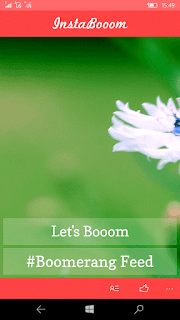
InstaBooom is a third party app for boomerang, desighned by DamTech Designs. This app allows you to Make Cool Looping Videos for Instagram and other Social Networks with Boomerang Effect. Learn how to use the app – It’s simple and easy to make Boomerang videos, choose a perfect picture you want to Boom, then Tap on the record button present inside the app and the app automatically starts applying effects to your video that’s it. you can preview the video there after. After your video is completely done, you can save High Quality Booms or you can share it on Social Networks. Apart from Main camera front camera also works with InstaBooom as well, allowing users to take perfect Boooms. Start Sharing your Boooms across the world by #InstaBooom and #Boomerang Hash Tags. Downloat it from Here!    #Alam

You will soon be able to comment in the windows insider Facebook Hub

Image
You’ll soon be able to comment in the Windows Insider Feedback Hub CAMERON BIGGS    EMAIL   @RCAMERONBIGGS MAR 31, 2016 AT 4: 10, Microsoft took a different approach by allowing users to download preview builds of their operating system by joining the Insider Preview. When you join this program you also had access to an Insider Hub app and a Windows Feedback app, that has since been merged together with to create the Feedback Hub. Here engineers have access to your comments on the latest updates, features, concerns or suggestions. With the introduction of window 10 In a tweet today  by a Microsoft engineer, we get confirmation that soon those participating in the Insider Program will be able to comment in the Feedback Hub app. This has the potential to open up a longer dialogue between users and engineers to better tailor the experiences of Windows 10 updates and apps to users experiences. Feedback Hub Comment Announcement There i...